

Yes, you can reliably automate YouTube Shorts, and it works whether you build the pipeline yourself or subscribe to a tool that does it for you. Speed favors a SaaS platform; control and low recurring cost favor a custom build. Either route only works long term if it includes a feedback loop that feeds performance data back into what gets made next.
TL;DR:
- Automating YouTube Shorts effectively requires a feedback loop that incorporates performance data to improve topic choice, scripting, and visual style over time.
- Building a custom pipeline offers lower recurring costs and greater control but demands ongoing maintenance of OAuth credentials, quota management, and debugging.
- Buying an automated platform like Brainrotify accelerates deployment and simplifies scheduling, making it ideal for creators prioritizing speed over cost.
- Scaling automation introduces risks of content saturation, which can be mitigated by rotating topics, hooks, voices, and excluding repeats based on performance metrics.
- Prioritizing data-driven adjustments to content strategy and feedback loops yields better long-term growth than focusing solely on visuals or technical perfection.
Table of Contents
- What Does a Youtube Shorts Automation Pipeline Actually Produce?
- How Do the Individual Pipeline Stages Work?
- Should You Build a Pipeline or Buy an Automation Tool?
- How Do You Publish Your First Automated Short This Week?
- What Breaks When You Scale, and How Do You Avoid It?
- Who Should You Trust for Youtube Shorts Automation Advice?
- What About Scheduling and Upload Automation Specifically?
- What the Data Actually Tells You to Prioritize
- Where Brainrotify Fits if You'd Rather Skip the Build
- Sources
- FAQ
What Does a Youtube Shorts Automation Pipeline Actually Produce?
A working system follows one line of logic: topic in, published video out, performance data looped back in. The flow runs topic selection → script → visuals → text-to-speech → render → upload → learn, with that last step distinguishing a real pipeline from a script that just posts on repeat.
The finished package coming out the other end usually includes:
- A vertical MP4 sized for 9:16 playback
- Burned-in captions synced to narration, or a companion SRT file
- A generated title, description, and thumbnail
- A scheduled publish slot rather than a manual upload
Most creators running this setup publish a small number of Shorts daily per channel. Time to first published video, once the components are wired together, typically runs a few hours for a technical builder and under 30 minutes for someone starting from a batch generation tool.
How Do the Individual Pipeline Stages Work?
Each stage in the chain has its own failure modes, and skipping the details here is where most automated channels break down within a few weeks.
- Topic sourcing. Feed an LLM a prompt template built around your niche, recent trend signals, and, once you have data, your own past performance. Vague prompts produce generic scripts, so specificity in the prompt template matters more than the model you pick.
- Script writing. Shorts live or die in the first two seconds, so structure scripts hook-first: one punchy opening line, then three or four sentences that pay it off. Generating two or three hook variants per topic and testing them against each other beats writing one script and hoping.
- Visual assembly. Decide upfront between licensed stock footage and AI-generated images. Stock is faster and cheaper per video; AI-generated visuals give more control over a consistent look but add render time and cost per clip. Either way, everything needs to be built or cropped for a 9:16 frame from the start.
- Text-to-speech. Options range from free tools like edge-tts to paid services like ElevenLabs, with voice cloning available if you want a signature narrator. Rotating between two or three voices keeps a channel from sounding identical video after video.
- Render. Tools like ffmpeg or MoviePy handle composition. Burned-in captions with word-level timestamps outperform separate SRT files because viewers see text synced directly to narration instead of having to enable subtitles.
- Upload. This is where OAuth and browser automation diverge, covered in detail below. Whichever you choose, build in retry logic and logging so a failed upload doesn't silently kill your schedule.
Pro Tip: Build resume capability into every stage, not just the render step. A pipeline that only re-runs the stage that failed instead of starting over saves both compute time and API credits when something breaks at 3 a.m.
Should You Build a Pipeline or Buy an Automation Tool?
The honest answer depends on what you're optimizing for: cost per video over time, or time to your first published Short.
Building your own pipeline makes sense when:
- You want the lowest possible recurring cost once the system is running
- You need a custom dataset, niche-specific prompt logic, or an offline/local LLM
- You have the technical background to maintain OAuth credentials, monitor quota, and debug a rendering queue
Buying a SaaS platform makes sense when:
- You want to publish this week, not after a multi-week build
- You want scheduling, rendering, and multi-channel publishing already integrated
- You'd rather pay a subscription than spend your own time on infrastructure
The maintenance burden is the part people underestimate. Someone has to own OAuth token refreshes, watch quota consumption, and keep the rendering environment from silently breaking after a library update. On the authentication side specifically, OAuth refresh tokens are the stable choice for scale; cookie-based browser automation tends to break whenever YouTube changes its login flow, which means someone is re-authenticating by hand on a schedule they don't control.
How Do You Publish Your First Automated Short This Week?
Getting from zero to a published, scheduled Short doesn't require months of development if you sequence the work correctly.
- Pick one niche and a realistic cadence, one Short a day beats three a day that stall after a week.
- Write or generate 10 to 20 seed prompts covering your topic's common angles before you build anything else.
- Create a Google Cloud project and OAuth credentials, and set up refresh tokens from the start rather than relying on short-lived session cookies.
- Wire the components together: topic source feeding an LLM, then TTS, then visual assembly, then an ffmpeg render step, then the uploader.
- Set up a scheduler, either a simple cron job or a GitHub Actions workflow, and run one full dry run before trusting it unattended.
- Check that captions are synced and the thumbnail actually reflects the video before your first real publish.
- Turn on basic performance scraping with yt-dlp or the Analytics API, and write one simple rule, like deprioritizing any topic category that underperforms twice in a row.
Pro Tip: Don't skip the dry run. Watching one full cycle execute end-to-end catches broken handoffs between stages before they cost you a wasted publish slot.
What Breaks When You Scale, and How Do You Avoid It?
Scaling from one Short a day to multiple channels publishing constantly introduces problems that don't show up at low volume.
The biggest one is content saturation. Automation makes low-effort repetition cheap, and audiences and the algorithm both notice when a channel starts repeating itself. The fix is a diversity system, not a bigger content queue.
- Topic rotation across categories so the same subject doesn't dominate every day
- Hook templates rotated so every video doesn't open the same way
- Voice rotation across two or three TTS voices instead of one flat narrator
- History exclusion so the topic engine can't regenerate something you already published
- Performance filters that feed your best and worst performers back into future prompts
On the metrics side, three numbers matter most for that feedback loop: views, watch time, and 15-second retention. Feed the top and bottom performers by those metrics back into your topic prompts, and the system tunes itself over time instead of guessing.
Quota planning matters just as much. The YouTube Data API commonly caps projects at 10,000 units a day, and a single upload consumes a meaningful share of that. Running multiple channels off one Google Cloud project means you're splitting a shared budget, so separate projects per channel are worth setting up before you scale, not after you hit a wall.
Who Should You Trust for Youtube Shorts Automation Advice?
Content automation credibility comes from watching what actually holds up at volume, not from theorizing about it. The open-source pipelines built by independent developers, autopilot-shorts among them, have already worked through the failure modes: fragile uploads, repetitive content, and quota exhaustion. That's a more useful education than a generic tutorial.
The pipelines that survive past a few months share one trait: they treat performance data as an input, not just an output. A system that publishes on schedule but never learns from what worked is a content calendar wearing an automation costume.
Brainrotify approaches the same job from the product side. It renders scripts into finished vertical videos with voiceover and captions, and it can schedule an ongoing content series so nothing publishes twice. What it handles automatically is generation and scheduling. What still deserves a human eye is topic judgment, brand fit, and catching the occasional script that reads fine but sounds off out loud.
What About Scheduling and Upload Automation Specifically?
Once your rendering pipeline works, the next decision is how videos get from a finished file to a live YouTube upload on schedule. Two mechanisms dominate: a cron-based scheduler and OAuth-based API uploads, versus a headless browser pretending to be a human clicking through YouTube Studio.
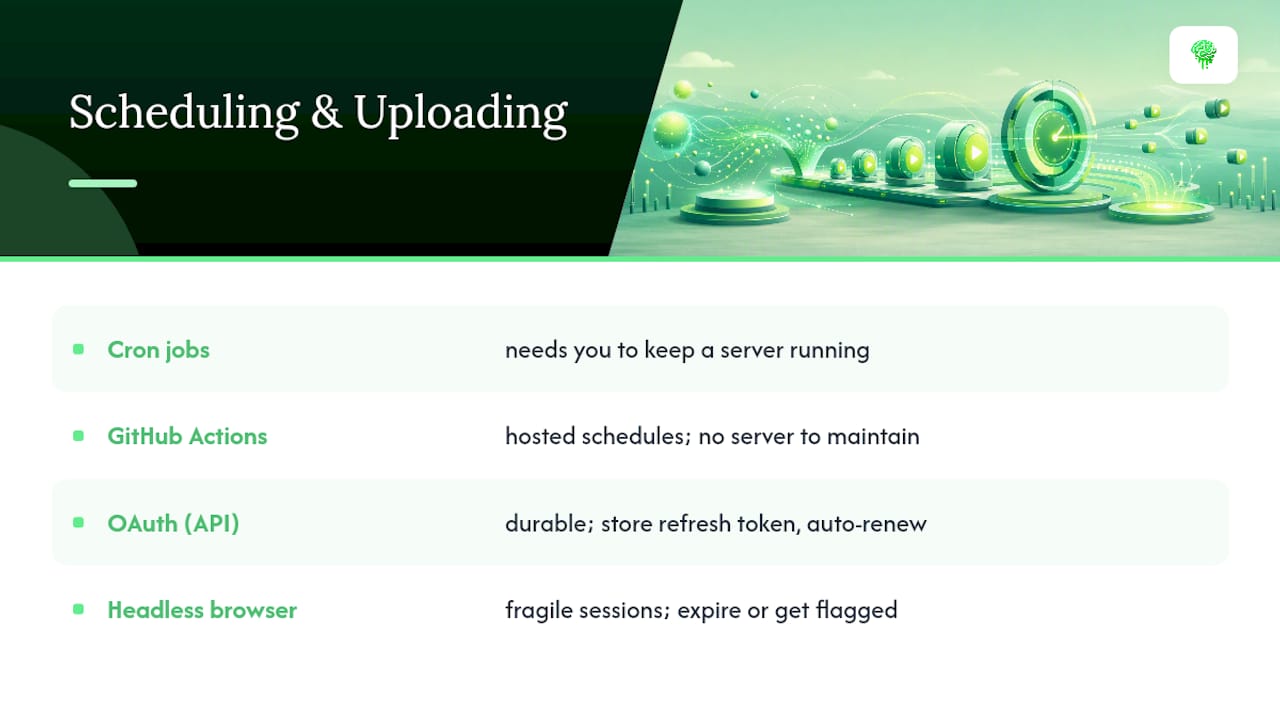
Cron jobs work fine on a server you already control, but they require you to keep that server running. GitHub Actions has become a popular alternative because it runs your pipeline on a schedule without you maintaining a separate machine. You define a workflow file, set a cron expression, and the platform executes your script on its own infrastructure. It's free for reasonable usage volumes and removes a whole category of "did my server stay up" failures.
The upload mechanism itself matters more than the scheduler around it. OAuth through the YouTube Data API is the durable option: you authenticate once, store a refresh token, and the pipeline renews access automatically without human intervention. Headless browser automation, by contrast, simulates a login through cookies or session tokens, and those sessions expire or get flagged, often without warning. A channel that depends on browser automation tends to fail quietly, sometimes for days, before anyone notices uploads have stopped.
For anyone planning to run more than one channel, treating quota as a per-project constraint from day one saves a painful retrofit later. Set up separate Google Cloud projects per channel if you're scaling past two or three, rather than discovering the shared quota ceiling mid-month.
What the Data Actually Tells You to Prioritize
Most guides to this topic spend their energy on the render stage, comparing TTS voices and caption styles, because that's the visible, satisfying part to build. The pipelines that actually last treat that as the easy half. The harder, more valuable half is the feedback loop: scraping views and retention, deciding what "underperforming" means for your niche, and writing prompt logic that actually changes based on that data.
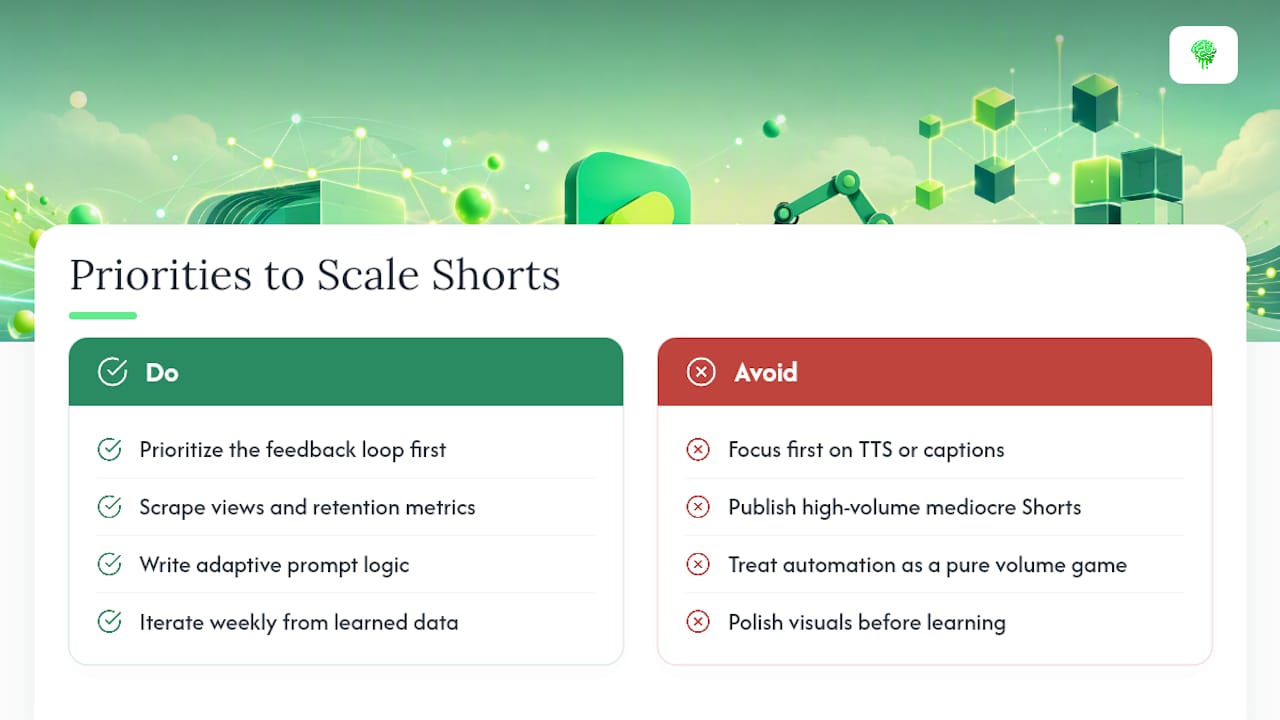
Conventional advice treats automation as a volume game, publish more, win more. That's backwards. A channel publishing three mediocre Shorts a day trains the algorithm to expect mediocrity. A channel publishing one Short a day that improves weekly because it's learning from its own data builds momentum that compounds.
If you're just starting, prioritize the feedback loop before you optimize anything else, even before you perfect your visuals or hunt for the ideal TTS voice. A rough pipeline that learns beats a polished one that doesn't.
— Lucas
Where Brainrotify Fits if You'd Rather Skip the Build
Building the pipeline described above is entirely doable, but it's also a real time investment before you publish a single video. Brainrotify collapses that entire chain, script, voiceover, captions, visuals, render, and posting, into one platform, which makes it the faster route for anyone who wants output this week instead of after a multi-week build.
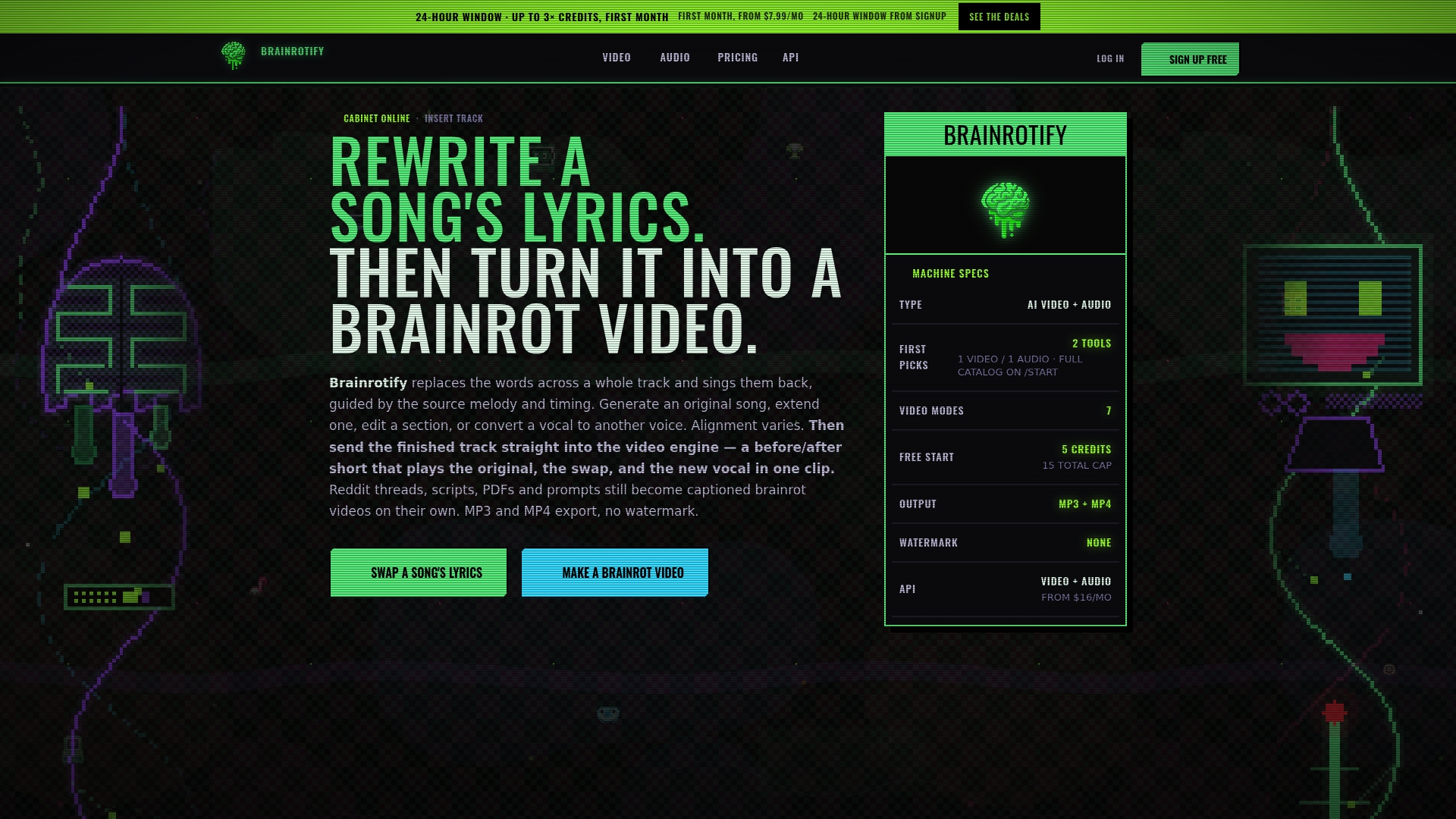
The features map directly onto what a DIY pipeline requires piece by piece: a batch generator for producing multiple Shorts at once, built-in scheduling so nothing needs a cron job, an API for developers who want to plug generation into their own systems, and both a lyric swapper and voice cloning for creators working in music parody or narrated formats. It covers the popular structures too, chat-style conversation videos among them, without requiring a separate visual pipeline for each format.
This fits faceless channel owners, meme page admins, and marketers managing several channels who'd rather spend their time on topic strategy than on maintaining OAuth tokens and a rendering server. There is a free tier with no watermarks, so you can test the full workflow before committing. Start with a single automated Short through the batch generator and see how it compares to your current process.
Sources
- stophobia/youtube-shorts-pipeline
- MIDiA Research — How AI can empower creators by cutting through content saturation
- GetPhyllo — YouTube API limits and best practices
FAQ
How much money is 1,000 views on YouTube Shorts?
Shorts revenue per view is low and variable because ad revenue is pooled and split across creators in the YouTube Partner Program, so view counts typically translate to a small fraction of a dollar rather than a fixed rate.
How many views do you need on YouTube Shorts to make $10,000?
There's no fixed view count because payout rates shift with audience location, season, and ad demand, so estimates should be treated as rough ranges rather than guarantees, and creators serious about revenue usually diversify into channel memberships, sponsorships, or driving traffic to longer-form content.
What is the 7 second rule on YouTube?
It refers to the idea that viewers decide whether to keep watching within the first few seconds of a Short, which is why pipelines like Brainrotify's and the open-source projects referenced above prioritize hook-first scripting over slow openings.
How many views on YouTube do you need to make $2,000 a month?
The number varies widely by niche and audience geography since ad rates aren't uniform, but consistent monthly income at that level generally requires a large, steady view volume plus supplemental revenue streams beyond ad share alone.
Is fully automated YouTube Shorts content against YouTube's rules?
Automation itself isn't against the rules, but YouTube's monetization policies require content to be original and not purely repetitive or mass-produced with no unique value, which is exactly why a feedback-driven diversity system matters more than raw publishing volume.